
How WoolyAI Works
Architecture at a glance
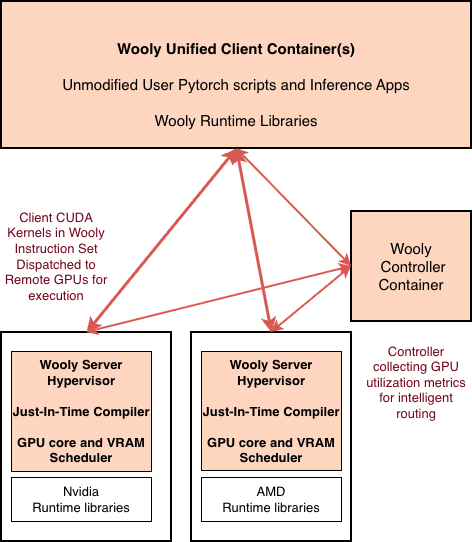
Unified Container – > WIS – > JIT on GPU nodes
WoolyAI Client
your ML container
- Wooly Client Container Image : Run your existing CUDA PyTorch / vLLM apps in a Wooly Unified Container on CPU or GPU machines
- Wooly runtime libraries inside the container intercept CUDA kernel launches, convert them to the Wooly Instruction Set (WIS), and dispatch to a remote GPU host.
WoolyAI Controller
orchestrator for Multi-GPU environments
- Routes Client requests across GPUs : Sends CUDA workloads to the best available GPU
- Uses live GPU Utilization & saturation metrics for Intelligent routing
WoolyAI Server
on GPU nodes
- Wooly Server Hypervisor receives WIS and performs Just-in-Time compilation to the node’s native backend (CUDA on NVIDIA, ROCm on AMD), then executes kernels. It retains all the hardware-specific optimizations and executes kernels with the native runtime drivers with near-native performance.
- Wooly Server runs concurrent kernel processes in a single context with greater control over resource allocation and isolation.
- Our GPU compute core & VRAM resource manager dynamically allocates resources across concurrent kernel process —no context switching or static time-slicing wastage.
Result
One image runs on both vendors—no config conflicts, no rebuilds.
Execute from CPU-only dev/CI while kernels run on a shared GPU pool.
More workloads per GPU with consistent performance.
Integration & Operations
Wooly Controller to manage client kernel requests across multiple GPU clusters – Wooly Controller routes client CUDA kernels to available GPUs based on live utilization and saturation metrics.
Integration with Kubernetes – Use Wooly Client Docker Image and your existing K8 workflow to spin up/manage ML dev environments. K8 pods are not bound to specific GPUs.
Ray for orchestration, Wooly for all GPU work – Ray head + workers run on CPU instances (or mixed), each worker uses the Wooly Client container. Ray doesn’t bind real GPUs.