
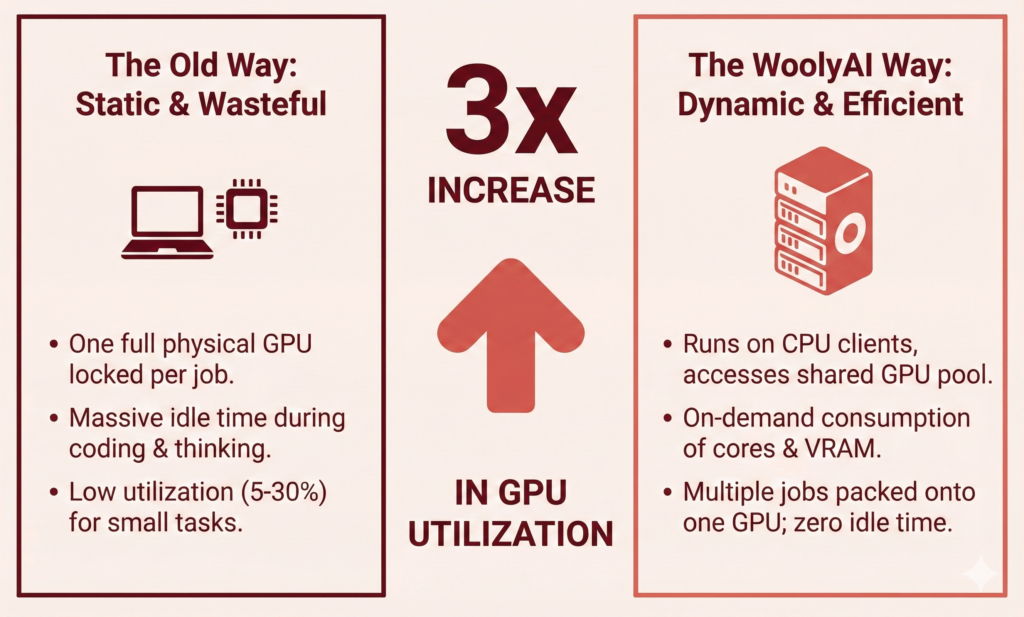
Stop letting idle GPUs drain your budget during the experimentation phase.
Machine learning development is expensive, but it doesn’t have to be wasteful. In the typical ML lifecycle, the “experimentation, dev, and test” stages are notorious for low GPU utilization. WoolyAI’s hypervisor software transforms this inefficiency, allowing you to run 3x more prototypes and experiments on your existing infrastructure.
The Hidden Cost in the ML Lifecycle
The typical experimentation lifecycle consists of four phases. While production (Phase 4) is usually optimized, Phases 1–3 are where your GPU resources go to die.
1. Prototyping (Local/Sandbox)
- The Workflow: Data scientists use Jupyter notebooks or small Python scripts for quick iterations on single GPUs.
- The Waste: Long idle times while coding or thinking, yet the GPU remains locked.
2. Small-Scale Experiments
- The Workflow: Moving from notebooks to reproducible pipelines for ablation studies, hyperparameter optimization (HPO), and model variants.
- The Waste: Running many small jobs (1–4 GPUs) that are spiky and short-lived, leaving unused compute cycles.
3. Pre-Production / “Canary” Training
- The Workflow: Near-production scale runs with larger datasets and strong logging.
- The Waste: Dedicating massive resources to experimental runs that don’t always need 100% of the allocated capacity.
4. Production Evaluation (A/B Testing)
- Note: This phase is typically fully deployed and optimized.
The Infrastructure Bottleneck
The Problem: During experimentation, you run many small-to-medium jobs. These jobs have variable GPU demands, short runtimes, and spiky usage.
The Reality: Standard infrastructure (Kubernetes, EC2, GKE, etc.) assigns a whole or multiple physical GPUs (or a fixed slice) to each job. Even if a notebook only needs 10% of a GPU, it locks the entire device. This “hard assignment” is the root cause of poor utilization.
The Solution: WoolyAI GPU Hypervisor
WoolyAI decouples your workloads from physical GPU hardware.
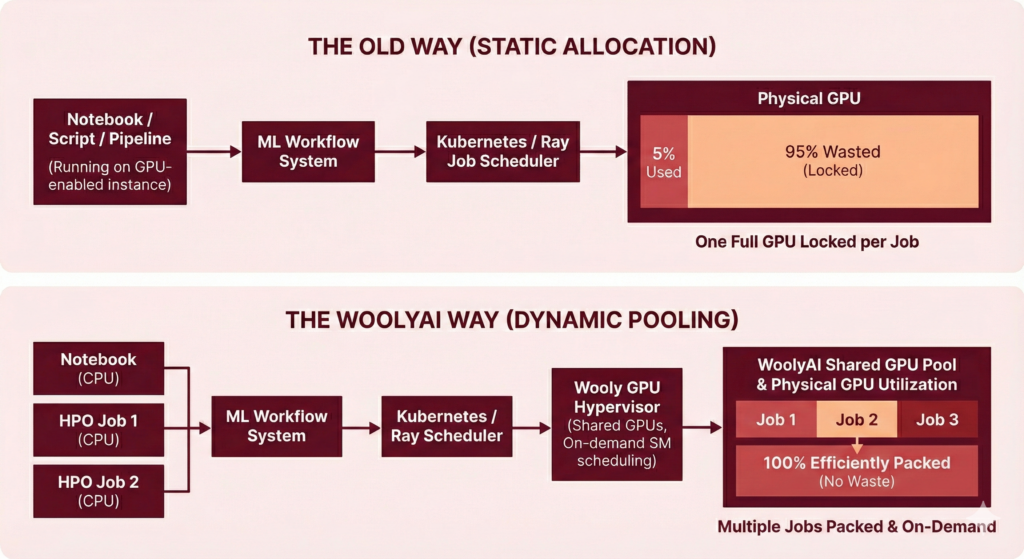
The Old Way (Static Allocation)
- Flow: Pipeline Step -> Requests GPU -> Locks 1 or more Full Physical GPU.
- Result: A Jupyter notebook using 5% compute power blocks 100% of a GPU.
The WoolyAI Way (Shared GPU Pool and Runtime GPU cores and VRAM scheduling
- Flow: Pipeline Step running on CPU-only host-> Submits Job -> Code requiring GPU executes on GPU from a shared GPU pool along with other jobs.
- Result: Jobs run on CPU-only infrastructure (like laptops or standard CPU instances) while kernel compute is offloaded to the shared GPU pool enabled by WoolyAI.
- Efficiency: GPU Resources are consumed on demand. Multiple jobs are “packed” onto the same physical GPU based on priority and actual utilization.
Impact: Before vs. After
Here is how WoolyAI transforms your daily dev/test operations.
1. For Prototyping & Notebooks
|
|
| Locked Resources: You spin up a server with 1 GPU. It sits idle while you code. | Virtual Resources: Your notebook runs on a cheap CPU instance. Code requiring GPU Compute is sent to the shared GPU pool. |
| Low Utilization: You use 5–30% capacity. | High Density: Support 3x more active users on the same hardware. |
2. For Small-Scale Experiments (HPO)
|
|
| Queue Jams: Dozens of HPO jobs fill the cluster immediately. | Smart Packing: The scheduler packs multiple variants (e.g., 4 runs) onto a single GPU. |
| Inefficient: Small batch sizes and short runs waste the overhead of a full GPU. | Fairness: Short and long jobs co-exist without starvation. |
3. For Canary Training
|
|
| Over-Provisioning: You dedicate entire GPUs to ensure performance. | Flexible SLAs: Choose “Exclusive Mode” for raw power or “High-Priority Shared Mode” to guarantee performance while filling gaps with lower-priority tasks. |
Summary
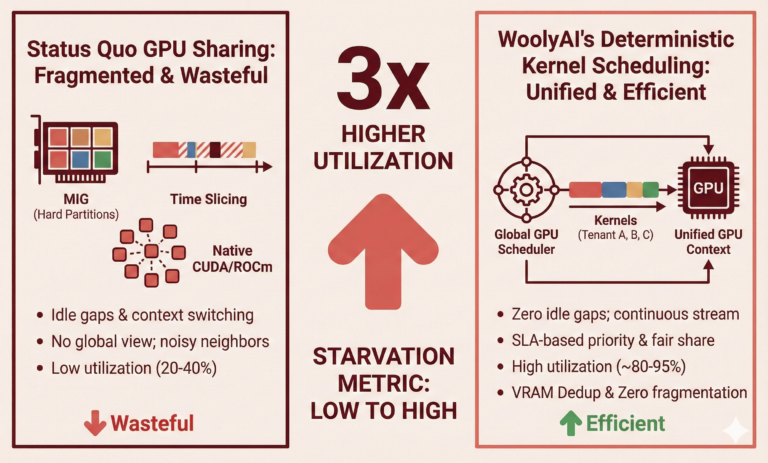
WoolyAI delivers a 3x increase in GPU utilization for Dev/Test without changing your code.
- Zero Code Changes: You still write
torch.cuda.device(0); WoolyAI handles the translation. - Runtime Consumption: Run Notebooks and Pytorch scripts on CPUs; consume GPU Cores and VRAM only when needed.
- Guaranteed Performance: Mix experimental workloads with critical training jobs using strict SLA controls.
